Maintenance technicians
Find which interlock is holding the machine off at 2am, from the OEM's .ACD, whatever version it was saved in.
See the workflowStudio 5000 project viewer · .ACD and .L5X · runs on your machine
The line is down and the machine builder's .ACD was saved in v33 while your laptop runs v30. Rungview opens it anyway: every rung drawn, every tag searchable, and a side-by-side diff of what the last update changed.
Get Rungview
.ACD and .L5X · read-only, never touches the PLC · files stay on your computer · cancel Pro any time.
How it works
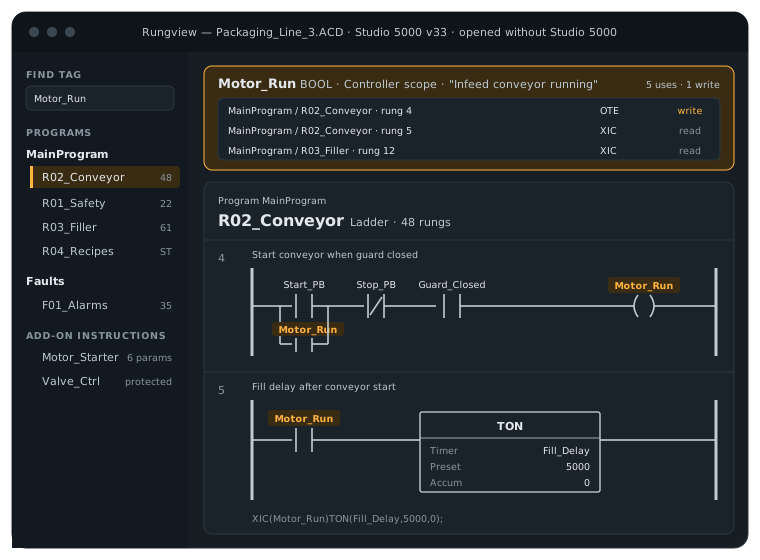
Drag the file into Rungview. It reads the project on your computer, whatever Studio 5000 version saved it, and lays out the controller, tasks, programs, routines, add-on instructions and tags.
Each ladder routine is drawn rung by rung with contacts, coils, branches and instruction boxes, rung comments and tag descriptions. Click any tag to list every rung and statement that reads or writes it.
Load a second version to see changed, added and removed rungs side by side, plus tags that were added, removed or retyped. Print routines to PDF, or export the .ACD as .L5X for an older Studio 5000 to import.
XIC, XIO, OTE, latches, nested branches, timers, counters, math and compare boxes, and AOI calls labelled with their parameter names.
A cross-reference for every tag: each use, marked read or write, one click from the rung.
Rung-by-rung diff of two projects, with the old and new ladder drawn one above the other.
Export the project as .L5X, which Studio 5000 imports at older versions too.
ST routines from .L5X show as written. From .ACD, Rungview recovers each compiled statement as readable pseudo-code, with tags clickable.
Rungview never edits a project and never connects to a controller. Nothing you do in it can change a running machine.
Who it's for
Different jobs, the same file: a Studio 5000 project you need to understand now, on a laptop that can't open it. Every project stays on your computer.
Find which interlock is holding the machine off at 2am, from the OEM's .ACD, whatever version it was saved in.
See the workflowRead a customer's existing code before you quote, and hand over a PDF and a clear change list with every update.
See the workflowSee exactly which rungs and tags the machine builder changed before the new program goes on your line.
See the workflowFiles
Studio 5000 Logix Designer projects for ControlLogix, CompactLogix and GuardLogix controllers.
The native Logix Designer project file, opened directly without Studio 5000 and regardless of the version that saved it.
The XML export of a full project. Opens free in Rungview, including Structured Text routines as written.
Ladder is drawn rung by rung. Structured Text is shown as source from .L5X, and as recovered statements from .ACD.
Listed in the project tree with their tags indexed. They are not drawn as diagrams yet.
Shown as protected with their parameters. Rungview does not remove or bypass source protection.
Rungview vs. the tools you have
| Tool | Limitation | Price |
|---|---|---|
| Studio 5000 Logix Designer | Windows only, needs the matching version or newer | Thousands per seat, per year |
| Online ACD viewer services | Upload the project to a third-party server | About $300 a month per file |
| Free L5X viewers | Read .L5X only, someone with Studio 5000 must export it first | Free |
| Rungview | .ACD and .L5X, any version, local, compare and PDF | Free · $9/mo or $59/yr |
Rockwell Automation, Studio 5000, Logix Designer, ControlLogix and CompactLogix are trademarks of their owners and are named here to describe file compatibility only. Rungview is independent and not affiliated with or endorsed by Rockwell Automation.
Pricing
View any .L5X project free, with no limit. Pro opens .ACD files directly and adds compare, PDF and L5X export.
$0
For reading exports and learning the code.
Get Rungview
.ACD and .L5X · read-only, never touches the PLC · files stay on your computer · cancel Pro any time.
$9/ month
For techs and integrators who get .ACD files.
Get Rungview
.ACD and .L5X · read-only, never touches the PLC · files stay on your computer · cancel Pro any time.
$59/ year
Everything in Pro for about $4.90 a month.
Get Rungview
.ACD and .L5X · read-only, never touches the PLC · files stay on your computer · cancel Pro any time.
Prices in USD. Rungview is a viewer. It does not edit projects, go online, or download to a controller; use Studio 5000 for that.
Machine programs are often under NDA, and plant IT rarely allows uploading them to a website. Rungview reads every project on your own computer: no upload, no account needed to open a file, and it works in a plant with no Wi-Fi. Exports are written to your disk and go only where you send them.
Enter your email and we send your Rungview link. The free plan opens any .L5X with no limit, no card needed.
Get Rungview
.ACD and .L5X · read-only, never touches the PLC · files stay on your computer · cancel Pro any time.
Yes. Rungview reads the .ACD project directly on your computer and draws its ladder logic, tags and project structure. You don't need a Logix Designer licence or any Rockwell software installed.
No. Logix Designer refuses projects saved by a newer major version, but Rungview reads the file itself, so a v33 project opens just as well as a v30 one.
No, and that is deliberate. Rungview is read-only. It never changes a project and never connects to a controller. Edits and downloads belong in Studio 5000, where firmware and safety checks apply.
Yes, on Pro. It exports the project as .L5X, which Studio 5000 can import even at an older version than the one that saved the .ACD, as long as the controller and instructions are supported there.
From an .L5X, Structured Text appears exactly as written. An .ACD stores ST in compiled form, so Rungview rebuilds each statement as readable pseudo-code with clickable tags. Original comments and formatting are not recovered from .ACD yet.
They are listed in the project tree but not drawn yet, and tags used only inside them do not appear in the cross-reference. Ladder and Structured Text are fully shown.
No. Protected AOIs are shown as protected, with their parameters and every place they are called. Rungview does not remove or bypass source protection.
No. Every project is read and processed on your own computer. Nothing is sent to a server.
Not today. Rungview is built for Studio 5000 / Logix Designer projects (.ACD and .L5X) for ControlLogix, CompactLogix and GuardLogix.